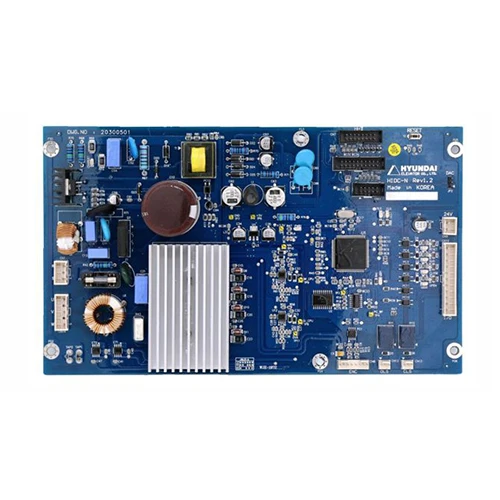
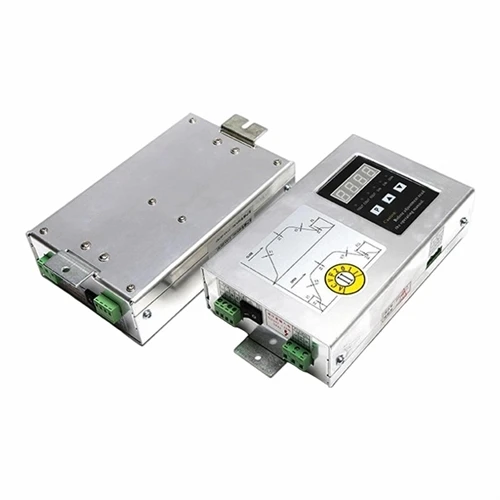
Hey there! As a supplier of the HYUNDAI Elevator Door Operator Board HIDC - N, I've seen my fair share of issues that can pop up with these boards. Today, I'm gonna walk you through how to troubleshoot the HIDC - N board step by step.
First off, let's talk about some common symptoms that might indicate there's a problem with the HIDC - N board. You might notice that the elevator doors aren't opening or closing properly. Maybe they're moving too slowly, getting stuck halfway, or not responding to the control signals at all. Another sign could be strange noises coming from the door mechanism when it's operating.
Initial Checks
The first thing you wanna do is a visual inspection. Take a good look at the board itself. Check for any obvious signs of damage like cracked components, burnt marks, or loose connections. Sometimes, a simple loose wire can cause all sorts of problems. Make sure all the cables are securely plugged in and there are no frayed wires.
Next, check the power supply. The HIDC - N board needs a stable power source to function correctly. Use a multimeter to measure the voltage at the power input of the board. The voltage should be within the specified range for the board. If the voltage is too low or too high, it could cause issues with the board's operation.
Software and Configuration
The HIDC - N board has its own software and configuration settings. Sometimes, a misconfiguration can lead to problems. Check the software version on the board. Make sure it's up - to - date. You can usually find the software version in the board's diagnostic menu. If there's a newer version available, it might be a good idea to update it.
Also, review the configuration settings. These settings control how the board interacts with the elevator's door system. Make sure the settings match the requirements of your specific elevator installation. For example, the door opening and closing speeds, the door reversal settings, and the safety features should all be configured correctly.
Communication Issues
The HIDC - N board communicates with other components in the elevator system, such as the control panel and the door sensors. If there are communication problems, it can cause the doors to malfunction. Check the communication cables between the HIDC - N board and other components. Make sure they're properly connected and there are no signs of damage.
You can also use diagnostic tools to check the communication status. Some boards have built - in diagnostic functions that can display error codes related to communication issues. If you see an error code, refer to the board's manual to find out what it means and how to fix it.
Sensor Checks
The elevator doors rely on sensors to detect obstacles and ensure safe operation. Check the door sensors to make sure they're working properly. Clean the sensors to remove any dirt or debris that might be blocking their operation. You can use a soft cloth and a mild cleaning solution to clean the sensors.
Test the sensors by placing an object in the path of the door. The door should stop and reverse when it detects the object. If the sensors aren't working correctly, it could be due to a faulty sensor or a problem with the sensor wiring.
Component Replacement
If you've gone through all the troubleshooting steps and still can't find the problem, it might be time to consider replacing some components. Start with the most common problem areas, such as the relays, capacitors, or transistors on the board. Make sure you use genuine HYUNDAI parts to ensure compatibility and reliability.
When replacing components, follow the manufacturer's instructions carefully. Make sure you disconnect the power supply before working on the board to avoid any electrical hazards.


Related Hyundai Elevator Parts
If you're also dealing with other Hyundai elevator parts, here are some links to check out. You can find more information about the HYUNDAI Elevator Display Board HIPD - CAN V3.2, the HYUNDAI Elevator Inverter Board WBVF - N, and the HYUNDAI Elevator Display Board HIPD - CAN V3.1. These parts are often used in conjunction with the HIDC - N board and might be relevant to your elevator system.
Conclusion
Troubleshooting the HYUNDAI Elevator Door Operator Board HIDC - N can be a bit of a challenge, but by following these steps, you should be able to identify and fix most problems. Remember to always follow safety procedures when working on elevator components.
If you're still having trouble or need more help, don't hesitate to reach out. We're here to assist you with all your HYUNDAI elevator parts needs. Whether you need more information about the HIDC - N board or other related parts, we can provide you with the support you need. Contact us to start a purchase negotiation and get the best solutions for your elevator systems.
References
- Hyundai Elevator Technical Manuals
- Industry - standard elevator troubleshooting guides